data tag
Luban supports record-level tag marking, and each data can have 0 or more tags. tag can be used to identify a record as a comment, either to filter the export, or to instruct the validator not to check this record.
Format Introduction
In different file formats, the way to fill in the record tag is similar, you can also refer to luban_examples/DataTables/Data/tag_datas directory examples.
excel format
Fill in the tag in the first column of the record.
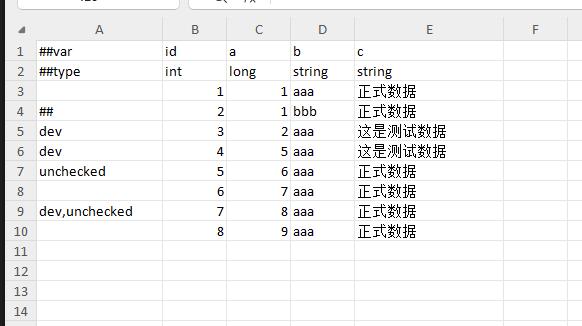
json format
{
   "__tag__": "dev",
   "id": 1,
   "name":"xxx"
}
lua format
return {
   __tag__ = "dev",
   id = 1,
   name = "xxx",
}
xml format
<data>
   <__tag__>dev</__tag__>
   <id>1</id>
   <name>xxx</name>
</data>
yaml format
__tag__ : dev
id : 1
name: xxx
special tag name
There are some special tag names that are used for special meaning.
- ##. Indicates that this record is annotated and will never be exported
- unchecked. Indicates that the validator does not check this record
Record filter export
There are several occasions where filter export is used
- Some records are only used for internal testing and do not want to be exported for official release
- Some records want different versions for testing and publishing
- Some simple multi-version management, such as a record is only exported in a certain version or branch
Use the command line parameter --includeTag or --excludeTag to include or exclude the data of the specified tag. The following is an example of usage.
| ##var | id | name | |
|---|---|---|---|
| ##type | int | string | |
| ## | id | desc1 | comment |
| 1 | item1 | export forever | |
| ## | 2 | item2 | never export |
| test | 4 | item4 | --excludeTag do not export when testing |
| TEST | 5 | item5 | Do not export when --excludeTag test |
| dev | 6 | item6 | --excludeTag dev does not export |
| 7 | item7 | export forever |