Excel Basic Header Conventions
This page covers: which sheets Luban treats as valid data tables, and how to fill basic types, enums, and nullable fields.
In one sentence
Mark headers in A1 (or the title area) with ## / ##var / ##type, etc.; data rows follow. Sheets whose A1 does not start with ## are ignored.
Supported files
xls / xlsx / xlsm / csv, and more. You can also use sheetName@file.xlsx to read only one sheet.
For CSV files not in GBK or UTF-8, Luban guesses encoding automatically; you usually do not need to specify it.
xlsx reads all sheets, but sheets whose A1 does not start with ## are ignored (use those for non-data notes).
Minimal complete example
Assume the row record type is Item, with fields id / name / price / on_sale:
| ##var | id | name | price | on_sale | #备注 |
|---|---|---|---|---|---|
| ##type | int | string | int | bool | |
| ##group | c,s | c | c | ||
| ## | 道具ID | 名称 | 价格 | 是否上架 | 策划备注列 |
| 1001 | 金币 | 0 | 是 | 基础货币 | |
| 1002 | 药水 | 50 | true | ||
| ## | 1003 | 草稿 | 1 | 否 | 本行是注释行,不导出 |
Key points:
| Row/column | Role |
|---|---|
##var (or first cell ##) | Field-name row |
##type | Type row |
##group | Export groups: c client, s server, empty = all targets |
## / ##comment | Comment row; can also hold Chinese field descriptions |
Field name starts with # or is empty | Comment column, not exported |
Data row whose first column starts with ## | Comment row, entire row not exported |
##xxx row order can vary; ##group and comment rows are optional. Prefer field names like xx_yy_zz; generation converts them to Pascal/camel case per language.
Filling basic types
| ##var | id | flag | ratio | title | open_time |
|---|---|---|---|---|---|
| ##type | int | bool | float | string | datetime |
| 1 | 是 | 1.5 | hello | 2024-01-01 12:00:00 | |
| 2 | 0 | 2024-06-01 | |||
| 3 | True | 0 | "" |
| Type | Valid values | Notes |
|---|---|---|
| bool | true/false/0/1/是/否 (case-insensitive) | Other values error |
| Integer / float | Numbers; column/column-constraint mode allows empty defaults | In stream/sep, must fill 0 explicitly |
| string | Empty cell = empty string | In stream format, empty string needs "" |
| string#escape=1 | Supports converting \n to newlines | |
| datetime | Excel date, or yyyy-mm-dd hh:mm:ss / yyyy-mm-dd hh:mm / yyyy-mm-dd hh / yyyy-mm-dd | Generally do not leave empty; missing time parts default to 0 |
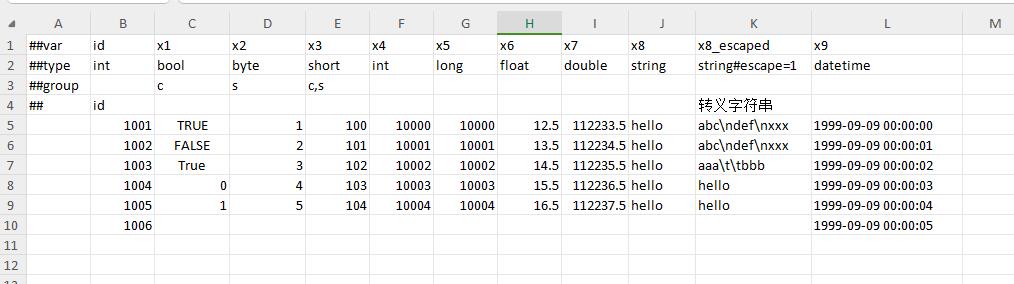
Enums
You can fill: enum name, alias, or integer value. Flags enums can use A|B (change separator via enum sep, e.g. sep="," → A,B).
Flags column-constraint mode (enum must be flags): use enum item names as child columns; fill 1/non-empty to include that flag; result is bitwise OR of all non-zero/non-empty items. See Nested structures.
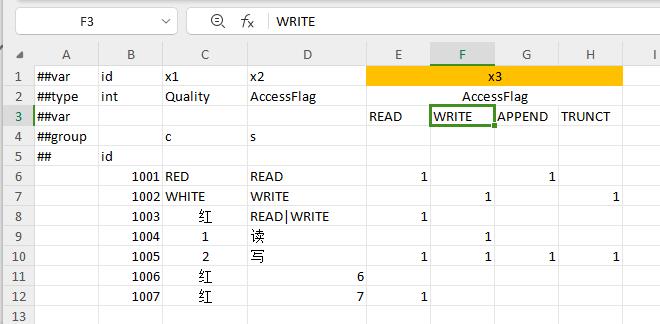
| ##var | id | quality |
|---|---|---|
| ##type | int | Quality |
| 1 | WHITE | |
| 2 | 白 | |
| 3 | 1 | |
| 4 |
If the enum has an item with value 0, you may leave the cell empty for that item; otherwise leaving it empty errors.
Nullable types
Except for containers, use T?. All of them accept null for empty.
| ##var | id | count | desc | pos |
|---|---|---|---|---|
| ##type | int | int? | string? | vector2? |
| 1 | 10 | hello | {}1,2 | |
| 2 | null | |||
| 3 | null | "" |
| Type | How to express empty |
|---|---|
Atomic types like int? | Leave empty or null |
string? | Leave empty = null; for empty string fill "" |
Non-polymorphic bean? | When non-null, must start with {} then fill fields; empty with null/leave blank |
| Polymorphic bean | Follow polymorphism rules; see Polymorphism |

Table mode examples (with Schema)
| Need | __tables__ / XML essentials | Data table shape |
|---|---|---|
| Ordinary id table | index=id, mode empty or map | One record per row, with a primary-key column |
| List without primary key | mode=list, index empty | List only, no Get(id) |
| Composite primary key | index=key1+key2 | Multiple columns unique together |
| Independent multi-index | index=key1,key2 | Multiple independent unique keys |
| Global singleton | mode=one | Usually one row; can use vertical tables |
<table name="TbItem" value="Item" index="id" input="item.xlsx"/>
<table name="TbNotKeyList" value="NotKeyList" mode="list" input="not_key_list.xlsx"/>
<table name="TbUnion" value="UnionRow" index="key1+key2" input="union.xlsx"/>
File organization
| input form | Meaning |
|---|---|
item.xlsx | Read all valid sheets in the file |
Bag@item.xlsx | Read only the sheet named Bag |
a.xlsx,b.xlsx | Merge multiple files into one logical table |
xlsx_dir | Read files under a directory |
Tables must be declared in Schema; see Add a table.
Common pitfalls
- Sheet A1 does not start with
##→ the whole sheet is skipped. - Created an xlsx but forgot to register it in
__tables__. - Filled values in a comment column and wondered why they were not exported.
- Left datetime empty and parsing failed.