Vertical Tables, sep, and Stream Filling
Composite data (beans, containers) has four common read modes in Excel:
| # | Mode | Notes |
|---|---|---|
| 1 | Stream, multi-cell | Span columns; read left to right; blanks often skipped |
| 2 | Stream, single cell + sep | One cell split by separators into a data stream |
| 3 | Column constraint, multi-cell | Child ##var rows pin each sub-field to a column; atomics support empty defaults |
| 4 | Multi-row (containers only) | Field name *name; one element per row; each element can use modes 1–3 |



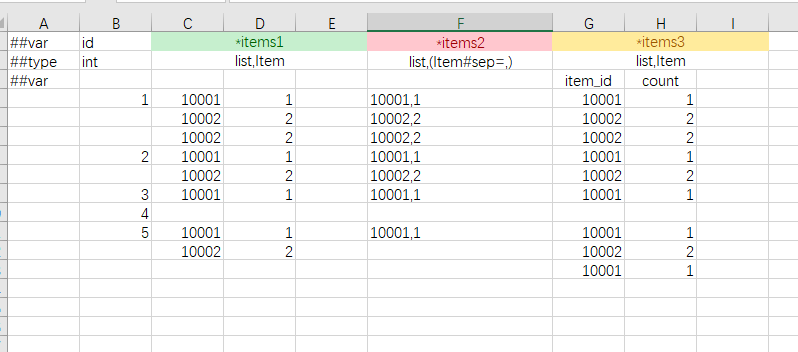
Column constraints can nest; multi-row applies only to container types.
Vertical tables (common for singleton config)
Horizontal table: one record per row. Vertical table: A1 is ##column or ##vertical, one field per row, good for global config.
Schema
<table name="TbGlobal" value="GlobalConfig" mode="one" input="global.xlsx"/>
<bean name="GlobalConfig">
  <var name="bag_init_size" type="int"/>
  <var name="bag_max_size" type="int"/>
  <var name="guild_open_level" type="int"/>
</bean>
Horizontal form (for comparison)
| ##var | bag_init_size | bag_max_size | guild_open_level |
|---|---|---|---|
| ##type | int | int | int |
| 20 | 100 | 10 |
Vertical form
A1 must be ##column (or ##vertical):
| ##column | ##type | ## |
|---|---|---|
| bag_init_size | int | 20 |
| bag_max_size | int | 100 |
| guild_open_level | int | 10 |
sep: write composite data in one cell
If giving each field its own column makes the table too wide, use sep=<char> to split within one cell.
sep can be written on:
| Location | Example |
|---|---|
| Excel field name | pos#sep=, |
| bean tags | <bean name="Vec3" tags="sep=,"> |
| type | Type1#sep=,, (list#sep=\|),int |
Multiple characters mean “any of these characters is a separator”, not that the whole string is one separator. When # / & are separators, write \# / \&.
Where sep appears and what it does:
| Location | Behavior |
|---|---|
Excel field name (e.g. x#sep=,) | Split each cell in that column range by sep, then read in stream mode |
bean tags (e.g. <bean tags="sep=,">) | Whole string split by sep, then stream-read bean fields |
type tag (e.g. Vec#sep=,, (list#sep=\|),int) | Next token is the whole value; split by sep and stream-read |
| container type | See below |
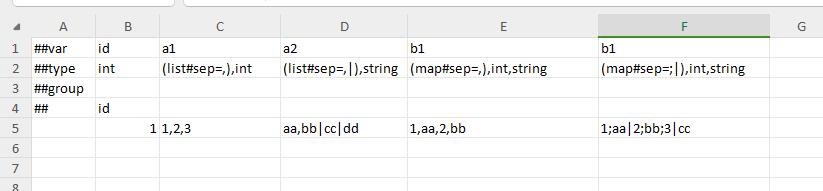
Two ways to apply sep on containers:
- On the container itself (e.g.
list#sep=|): next string is the whole container; split by sep and read elements. - On the element type (e.g.
list,(Vec#sep=,)): each element segment is split separately.
Combined example: (list#sep=|),(Vec#sep=,) — list elements separated by |, Vec by ,.


Example: Vec3
<bean name="Vec3" sep=",">
  <var name="x" type="float"/>
  <var name="y" type="float"/>
  <var name="z" type="float"/>
</bean>
| ##var | id | pos |
|---|---|---|
| ##type | int | Vec3 |
| 1 | 1.0,2.0,3.0 | |
| 2 | 0,0,1 |
Or declare only on the field name: pos#sep=,, with type still Vec3.
Example: nesting + sep
<bean name="Type1">
  <var name="a" type="int"/>
  <var name="b" type="string"/>
  <var name="c" type="bool"/>
</bean>
<bean name="Type3">
  <var name="a" type="int"/>
  <var name="b" type="bool"/>
  <var name="c" type="Type1#sep=,"/>
</bean>
| ##var | id | a | b | c |
|---|---|---|---|---|
| ##type | int | int | bool | Type1#sep=, |
| 1 | 10 | true | 1,hello,false |
→ c = { a:1, b:"hello", c:false }.
Example: list + sep
Field name nums, type (list#sep=|),int:
| ##var | id | nums |
|---|---|---|
| ##type | int | (list#sep=|),int |
| 1 | 1|3|5|9 |
→ nums = [1,3,5,9].
Stream semantics
When stream mode applies: non-atomic data (bean/container) is limited to a column range or a sep segment, and sub-fields are not column-constrained — child data is read in stream order.
| Behavior | Notes |
|---|---|
| Blank cell | Often skipped (cannot distinguish blank from default) |
| Nullable bean | null / {} / type name have special rules |
| End of container | Read until } or end of stream |
Therefore “leave empty for default” does not work in sep/stream cells — fill explicit defaults:
| Type | Empty/default in stream mode |
|---|---|
| bool | Must fill false / true |
| int / float | Must fill 0 or another valid number |
| string | Empty string as "" |
Nullable (e.g. int?) | null |
| Container | Empty container ends with } |
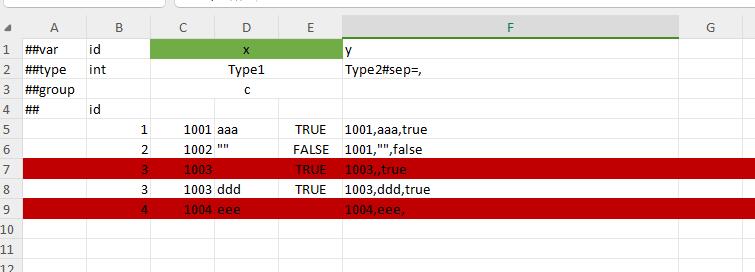
Red rows that leave bool/string blanks are skipped and cause “insufficient data” errors.
Stream read rules by type:
- Polymorphic bean: read type name string, then stream-read subclass fields
- Nullable bean: read string first;
null= empty;{}or type name = non-null and continue. Valid Vec3:1,2,3,null,{},1,2,3,vec3,1,2,3 array/list/set: stop on}or end of stream; else read elements in a loopmap: read key/value pairs in a loop until}or end of stream
Compare with column constraints: when pinned to atomic columns, empty can mean default; bean/container interiors without sub-field pins still use stream mode.
Common pitfalls
- Forgot to change A1 to
##columnfor a vertical table. - Number of sep segments does not match the number of fields.
- Used blanks for 0/false in a stream cell, causing field misalignment.