Nested Structures and Collections
This page covers: filling beans, list/array/set/map in Excel, plus multi-level headers and multi-row lists.
When one field spans multiple columns in Excel, mark the range with merged cells (do not repeat the field name in every column). The HTML tables below use colspan to simulate merges.
CSV and formats without merged cells
CSV cannot merge cells. To span multiple columns, put [{fieldName} in the start column and {fieldName}] in the end column; leave middle columns empty. This is equivalent to Excel merges.
Example: field nums (list,int) spans columns C–F: C1=[{nums}, F1={nums}]; the ##type row still says list,int; fill elements left to right.

Element types can be enums or beans; array / list / set work similarly.

For a single cell, use sep= to specify a separator (e.g. sep=,, |, ;); see sep and stream.
Why multi-level headers (column constraints)
If composite data is filled purely in stream order across columns, blank cells are skipped, which misaligns fields easily; stream mode also does not support “empty = default”. Adding a child ##var row names sub-fields and pins each to a column.

You can nest to any depth (x1 one level, y1 two levels, z1 three levels, etc.).
Define the structures first
The examples below share these beans (XML sketch; you can also use __beans__.xlsx):
<bean name="Cost">
  <var name="id" type="int"/>
  <var name="count" type="int"/>
</bean>

<bean name="Reward">
  <var name="item_id" type="int"/>
  <var name="num" type="int"/>
  <var name="desc" type="string"/>
</bean>
Bean: fill across merged columns
Field cost has type Cost. On the first row, merge two columns for cost; on the next ##var row, write the child field names:
| ##var | id | cost | name | |
|---|---|---|---|---|
| ##var | id | count | ||
| ##type | int | Cost | string | |
| 1 | 1001 | 5 | 兑换A | |
| 2 | 1002 | 1 | 兑换B | |
How to read it: cost spans two columns; the child row is id / count.
Equivalent understanding: id=1, cost={id:1001,count:5}, name=兑换A.
Nested beans
When reward nests another cost: merge reward on the outer level, then merge cost inside:
| ##var | id | reward | |||
|---|---|---|---|---|---|
| ##var | item_id | num | cost | ||
| ##var | id | count | |||
| ##type | int | int | Reward | ||
| 1 | 2001 | 10 | 1001 | 2 | |
You can also skip multi-level headers and pack the nested structure into one cell with sep / compact format.
list / array / set
Use merged cells to mark the full column span of the list; fill elements left to right; blank cells are often ignored.
list,int (up to 4 elements)
| ##var | id | nums | |||
|---|---|---|---|---|---|
| ##type | int | int | int | int | int |
| 1 | 1 | 3 | 5 | ||
| 2 | 10 | ||||
Result: id=1 → nums=[1,3,5]; id=2 → nums=[10].
list,Cost
Each element takes the bean width (here 2 columns), then multiple elements are laid out horizontally; the first row still merges costs only once:
| ##var | id | costs | |||
|---|---|---|---|---|---|
| ##var | id | count | id | count | |
| ##type | int | int | int | int | int |
| 1 | 1001 | 2 | 1002 | 1 | |
→ costs=[{1001,2},{1002,1}].
map
map,int,string: within the merged range, fill key/value pairs.
| ##var | id | dict | |||
|---|---|---|---|---|---|
| ##type | int | int | string | int | string |
| 1 | 1 | 剑 | 2 | 盾 | |
→ {1:"剑", 2:"盾"}.
Single cell + dual sep
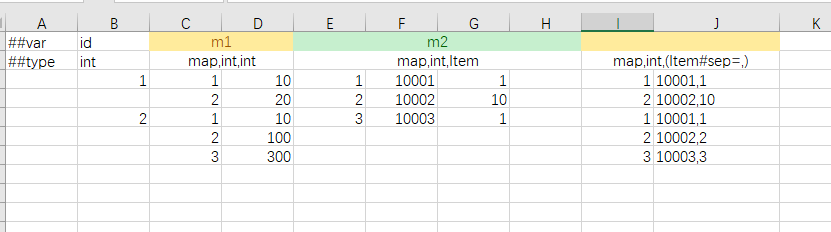
Maps can also be filled in one cell. To separate key/value and each pair, configure two separators, e.g. map#sep=,; or (map#sep=,;),int,Item#sep=,: the first splits pairs, the second splits key from value (or fields inside value). When value is a bean, each value segment is read in stream mode with sep.

When value is a struct:

Maps also support *fieldName multi-row filling:
Column-constrained form (keys as child column names)
Merge attrs on the upper level; use fixed keys as column names below:
| ##var | id | attrs | ||
|---|---|---|---|---|
| ##var | atk | def | hp | |
| ##type | int | int | int | int |
| 1 | 10 | 5 | 100 | |
Non-empty cells mean that key-value exists. Example: for id=1, y2 has child columns aaa and ccc with 1 and 2 → {{"aaa",1},{"ccc",2}}; id=2 with bbb=10, ccc=20, ddd=30 → {{"bbb",10},{"ccc",20},{"ddd",30}}.
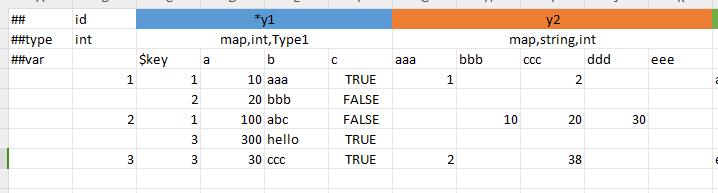
The above is column-constrained map filling. In stream/sep cells, maps also support alternating key-value and compact sep forms; see sep and stream.
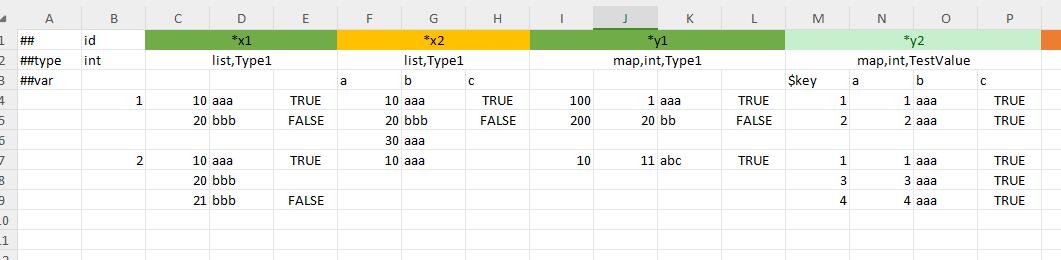
Column constraint + multi-row ($key)
In multi-row mode, the $key child column is the map key; remaining columns are value sub-fields (good when value is a bean).
Multi-row list *<name>
When the field name is written as *rewards, multiple rows under the same primary key represent multiple list elements; merge columns for *rewards on the first row:
| ##var | id | *rewards | ||
|---|---|---|---|---|
| ##var | item_id | num | desc | |
| ##type | int | int | int | string |
| 1 | 1001 | 1 | 第一项 | |
| 1002 | 2 | 第二项 | ||
| 2 | 2001 | 1 | ||
→ id=1 has two rewards; id=2 has one. Good for “one main row + many sub-config rows”.
Arbitrary nesting is supported: each element in a multi-row list can itself be multi-row. For array,bean / list,bean, pair with column constraints on element sub-fields.
Extra column-constrained notes
Under column constraints, only atomic types (e.g. int, string) support default values when left empty (int→0, int?→null). If the lowest constrained type is still a container or bean (sub-fields not pinned), child data is still read in stream mode and blanks are skipped.

| Form | Purpose |
|---|---|
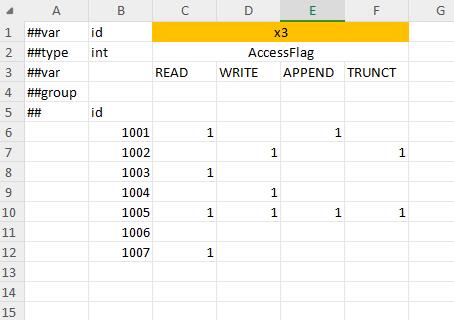
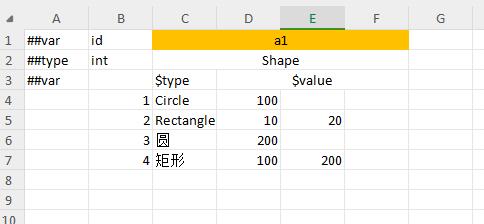
$type | Type column for polymorphic / nullable beans; for flags enums (flags=1), enum items as child columns, OR of non-zero/non-empty cells |
$value | Limits actual bean field range; fill all fields in stream mode inside $value |
$key | Key column for map multi-row mode |
Flags enum column constraint example:
Polymorphic $type + $value example:
Common pitfalls
- Merged column count does not match the columns actually used by the bean / container.
- Docs or headers repeat the field name in every column, which mismatches Excel merge semantics and confuses designers.
- Blanks in the middle of a
listare ignored, shifting elements (use compact format or explicit separators when you need placeholders). - map has only key, no value.
- Container element types marked nullable (current rules generally disallow this).